White Tuxedo Man with Neon Sunglasses Prompt
Prompt
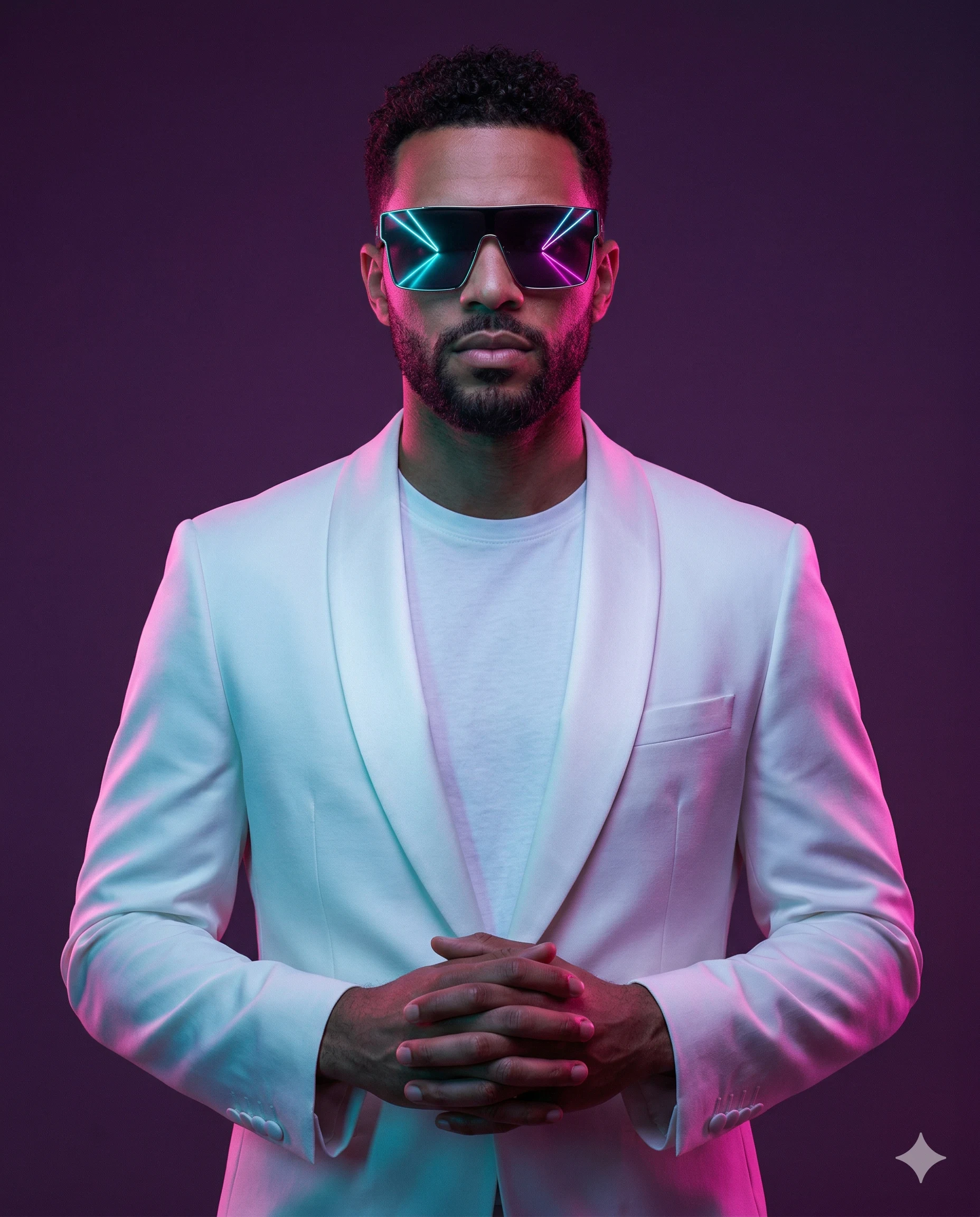
Create an ultra-realistic cinematic fashion editorial portrait of a man in a bold, cyberpunk-noir aesthetic. Use the uploaded image for identity reference.
Character Identity (VERY IMPORTANT):
MUST preserve exact facial structure, hairstyle, grooming details, and unique features from the uploaded image
Maintain high likeness accuracy
Do NOT over beautify or alter identity beyond recognition
Composition:
Centered, medium shot (waist-up). The subject is perfectly aligned in the frame, creating a symmetrical, balanced composition with strong visual presence.
Ensure generous overhead (top) negative space above the head and equal negative space on both left and right sides for perfect visual symmetry and breathing room.
Pose & Expression:
The man stands upright in a confident power pose, hands clasped in front of his midsection. Shoulders are pulled back, and the head is slightly tilted upward, conveying calm authority and dominance. His expression is composed, serious, and self-assured, looking directly into the camera.
Outfit:
Premium monochromatic white ensemble — a tailored slim-fit white tuxedo jacket with a satin shawl lapel layered over a premium white crew-neck t-shirt. The clean white styling contrasts sharply with the vibrant lighting.
Accessories:
Oversized futuristic square sunglasses with reflective lenses, featuring vivid neon reflections. The lenses clearly reflect symmetrical light streaks / LED-like lines in cyan and magenta tones, creating a sleek cyberpunk glow. The reflection should feel sharp, graphic, and mirror-like, enhancing the futuristic aesthetic.
Background:
Minimalist studio backdrop with a smooth matte finish, featuring a soft gradient blend of deep violet, magenta, and purple tones. No distractions.
Lighting:
Rim Lighting: Strong magenta/pink backlighting to separate the subject from the background.
Key/Fill: A mix of cool blue (cyan) and warm pink light hitting the subject from opposite sides (Chiaroscuro-style neon lighting).
High-contrast, cinematic chiaroscuro effect with smooth shadow transitions
Subtle reflections visible on sunglasses
Camera & Technical:
Low-angle (slightly below eye level) to enhance dominance
Shot on 85mm prime lens
Aperture f/2.8 for sharp subject focus with slight background falloff
Ultra-detailed, crisp textures
Style:
Cyberpunk, synthwave, modern luxury fashion editorial, cinematic color grading
Output:
Aspect ratio 4:5, 8K resolution, ultra-realistic, high detail, sharp focus
How to use this prompt
Paste the complete prompt into Gemini. Add any required reference image, generate the first version without rewriting the source prompt, and then request one precise revision at a time.
Best AI model
Gemini is the model identified by the original source page for this prompt.
Tips for better results
• Attach a clear, well-lit reference image and state which identity details must remain unchanged.
• Keep the requested 4:5 framing during revisions.
• Preserve the specified lighting direction and contrast before changing wardrobe, pose, or background.
• Generate the complete prompt first, then refine one visual detail per revision.
• Keep the core subject and composition consistent while comparing variations.
Frequently Asked Questions
What does “Prism Vision” create?
It creates the subject, composition, and visual treatment described in the original prompt.
Which model should I use?
The source identifies Gemini; follow the prompt's own model and reference-image requirements.
Can I customize the result?
Yes. Generate the original prompt first, then change one detail at a time while preserving the core composition.