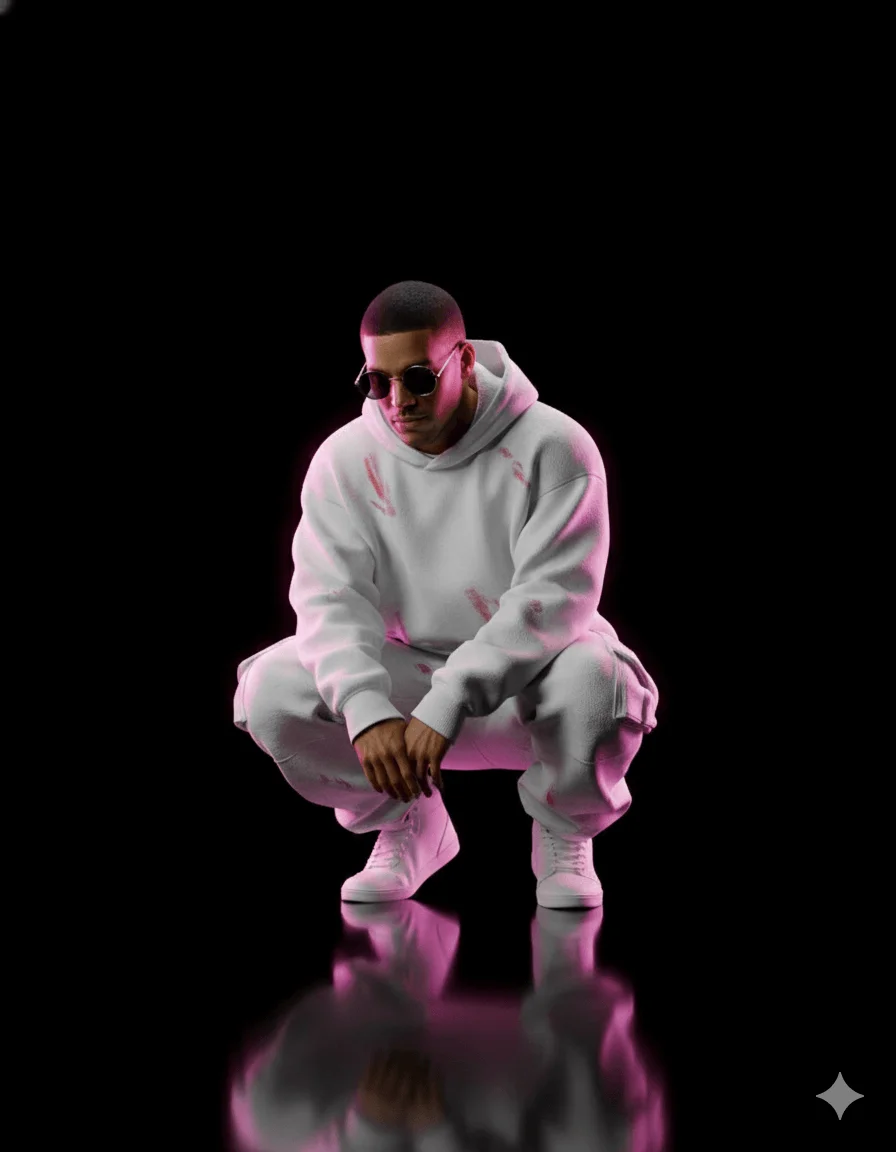
Pink Neon Shadow Streetwear CGI Portrait Prompt
Prompt
Create A detailed, hyper-realistic CGI rendering of a lone figure (image uploaded), possibly a man, with dark hair, as he looks introspectively downwards. He is in a low squatting pose, centered in the frame. He wears round sunglasses and an oversized, hooded white sweatshirt and baggy white cargo pants, both with subtle distress and faint red or pink abstract markings, paired with pristine white high-top sneakers. The setting is a minimalist, pure black void with a perfectly glossy, dark, reflective floor that mirrors the figure sharply. Dramatic low-key lighting illuminates the subject from above and slightly in front, creating soft highlights on his white attire. A powerful, vibrant neon pink and magenta rim light sharply outlines his entire form from behind and the sides, casting an intense, glowing pink aura onto the reflective floor around his reflection. The overall mood is melancholic and mysterious, blending urban streetwear with a conceptual, isolated aesthetic. Ensure sharp focus, clean lines, and no distracting elements, blurry areas, or poor reflections.
How to use this prompt
Paste the complete prompt into Gemini. Add any required reference image, generate the first version without rewriting the source prompt, and then request one precise revision at a time.
Best AI model
Gemini is the model identified by the original source page for this prompt.
Tips for better results
• Attach a clear, well-lit reference image and state which identity details must remain unchanged.
• Preserve the specified lighting direction and contrast before changing wardrobe, pose, or background.
• Generate the complete prompt first, then refine one visual detail per revision.
• Keep the core subject and composition consistent while comparing variations.
Frequently Asked Questions
What does “Neon Shadow” create?
It creates the subject, composition, and visual treatment described in the original prompt.
Which model should I use?
The source identifies Gemini; follow the prompt's own model and reference-image requirements.
Can I customize the result?
Yes. Generate the original prompt first, then change one detail at a time while preserving the core composition.