Man at Tropical Waterfall Fashion Portrait Prompt
Prompt
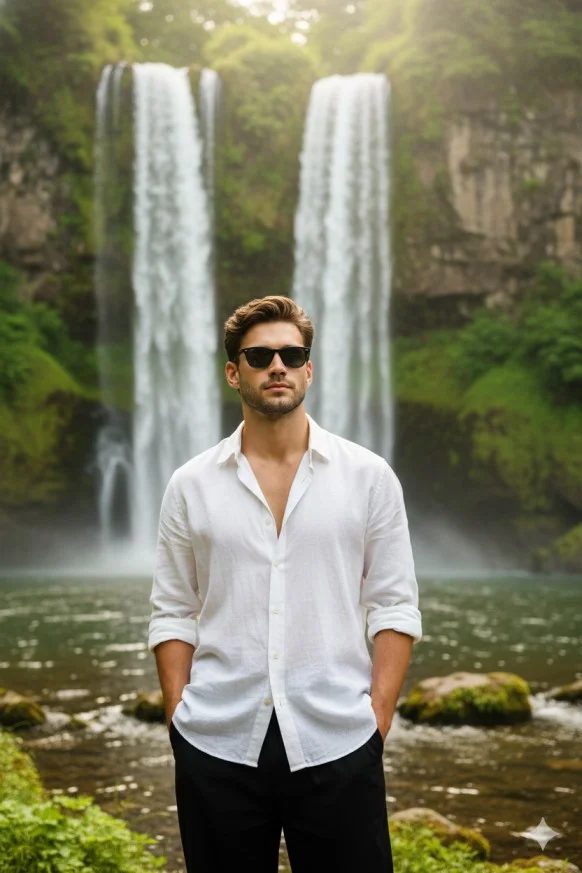
Ultra-realistic cinematic outdoor portrait using the same person from the reference image.
Face, beard, hairstyle, skin tone, and expression must remain 100% identical. Do not change the face.
A young man stands confidently in front of a tall twin waterfall surrounded by lush green cliffs and moss-covered rocks.
Pose: relaxed masculine stance, both hands in trouser pockets, body facing forward, head turned slightly left, calm and confident expression.
Outfit:

White lightweight linen button-down oversize shirt with visible natural wrinkles, top buttons open, sleeves rolled.

Black baggy pant.

Black classic sunglasses.

Environment: rocky lake/river pool at the base of the waterfall, visible stones and gentle ripples, dense green vegetation on cliffs. Water mist is softly glowing around the person cinematic DSLR Photography style.
Lighting & Tone: Natural dreamy lighting with soft warm highlights, subtle glow through mist. Bright green-yellow-white color palette, clean and airy.
Framing: mid-thigh to head, subject centered lower frame with wide headroom showing the full waterfall.

DSLR realism, shallow depth of field, cinematic clarity, 8K photorealistic.
How to use this prompt
Paste the complete prompt into Gemini. Add any required reference image, generate the first version without rewriting the source prompt, and then request one precise revision at a time.
Best AI model
Gemini is the model identified by the original source page for this prompt.
Tips for better results
• Attach a clear, well-lit reference image and state which identity details must remain unchanged.
• Preserve the specified lighting direction and contrast before changing wardrobe, pose, or background.
• Generate the complete prompt first, then refine one visual detail per revision.
• Keep the core subject and composition consistent while comparing variations.
Frequently Asked Questions
What does “Chasing Waterfalls” create?
It creates the subject, composition, and visual treatment described in the original prompt.
Which model should I use?
The source identifies Gemini; follow the prompt's own model and reference-image requirements.
Can I customize the result?
Yes. Generate the original prompt first, then change one detail at a time while preserving the core composition.