Man in Charcoal Suit with Vintage Luxury Car Prompt
Prompt
Prompt Title
High-End Fashion Editorial Studio Portrait with Vintage Luxury Car
Subject
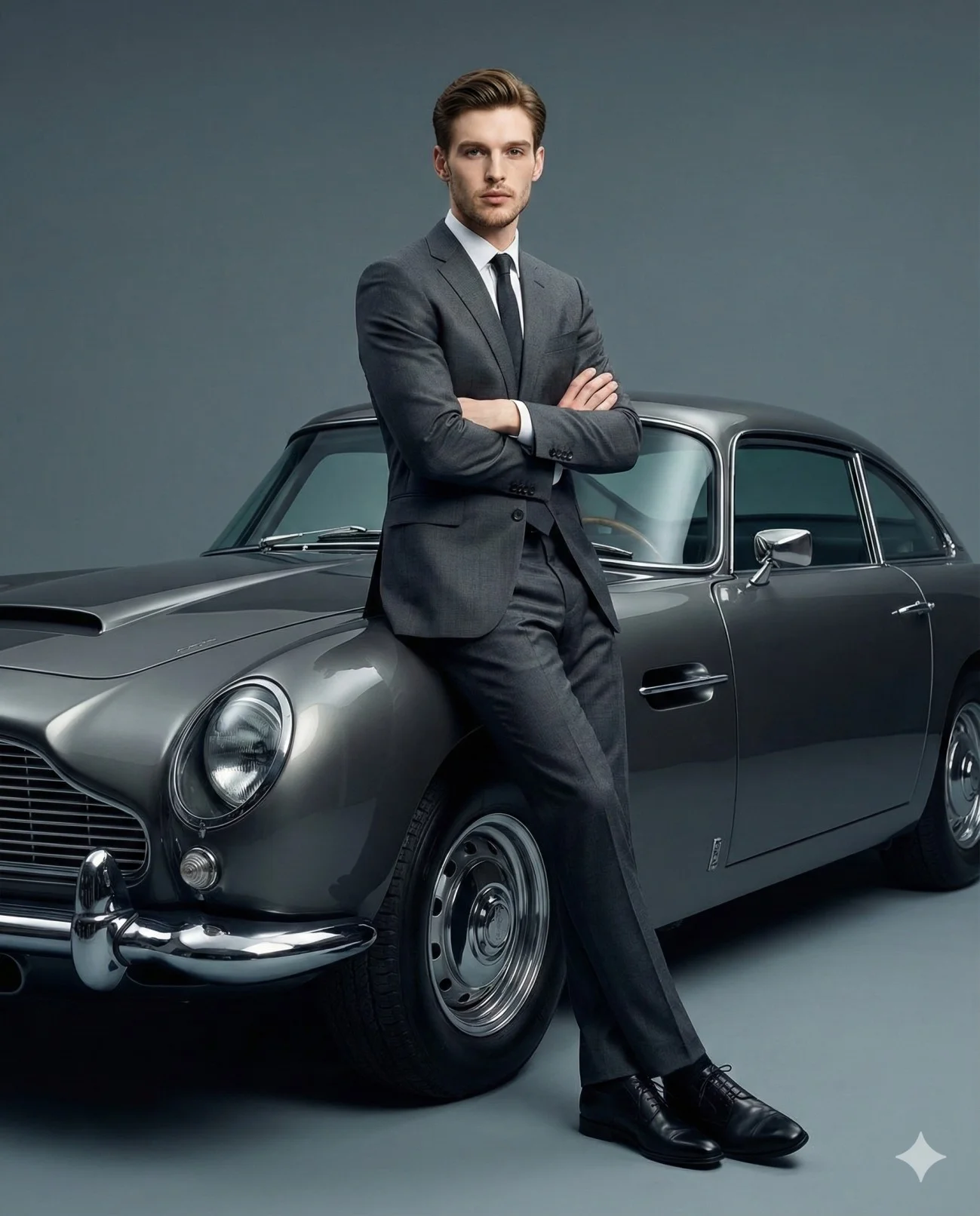
Confident man
Face match / reference face enabled
Preserve facial structure, hairstyle, expression, and overall likeness
Calm, serious, self-assured expression
Direct eye contact with the camera
Natural style hair with classic volume
Light stubble visible
Pose & Body Language
Leaning against a vintage luxury car
Positioned slightly right of center
Arms crossed
Shoulders squared
One leg straight, the other slightly bent
Body language conveys relaxed authority and confidence
Wardrobe & Styling
Perfectly tailored charcoal gray suit
Crisp white dress shirt
Slim dark tie
Polished black leather dress shoes
Clean, refined, luxury fashion styling
Vehicle
Pristine mid-20th-century dark, metallic gunmetal grey vintage luxury car
Rounded front
Circular headlights
Chrome accents
Sculpted side vents
Polished alloy wheels
Front half of the car visible in frame
Background
Studio setting
Background: It is a solid, matte slate grey. It is slightly lighter and flatter than the car's paint, providing a smooth, neutral studio backdrop that allows the metallic sheen of the car and the suit to stand out.
Bold graphic contrast
Lighting
Soft, controlled, cinematic lighting
Primary light source from front-right
Even illumination on subject and car
Subtle shadows shaping:
Jawline
Suit folds
Car contours
Camera & Composition
Slightly low-angle shot
Medium focal length (50–85mm)
Vertical framing
Full body visible
Front half of the car included
Deep focus
Ultra-sharp, high-detail image quality
Mood & Aesthetic
Timeless
Masculine
Luxurious
Minimalist
Evokes success, refinement, and quiet power
Style Keywords
Luxury fashion campaign
Studio photography
Cinematic lighting
Minimalist background
Bold color blocking
Timeless masculinity
Ultra-detailed
Photorealistic
Editorial polish
Technical Parameters
Face match / reference face: Enabled
Aspect ratio: 4:5
How to use this prompt
Paste the complete prompt into Gemini. Add any required reference image, generate the first version without rewriting the source prompt, and then request one precise revision at a time.
Best AI model
Gemini is the model identified by the original source page for this prompt.
Tips for better results
• Attach a clear, well-lit reference image and state which identity details must remain unchanged.
• Keep the requested 4:5 framing during revisions.
• Preserve the specified lighting direction and contrast before changing wardrobe, pose, or background.
• Generate the complete prompt first, then refine one visual detail per revision.
• Keep the core subject and composition consistent while comparing variations.
Frequently Asked Questions
What does “Grey Suit & Classic Curves” create?
It creates the subject, composition, and visual treatment described in the original prompt.
Which model should I use?
The source identifies Gemini; follow the prompt's own model and reference-image requirements.
Can I customize the result?
Yes. Generate the original prompt first, then change one detail at a time while preserving the core composition.